Skip to content
Facebook
  • My Portal
  • My PBX
  • My Hosting
  • Help Me
  • Business
    • 1300/1800 Number Plans
    • Business Internet
    • Business PABX Sign Up
    • Business Phone Plans
    • Equipment & Hardware
    • Hosting Pans
    • Microsoft Teams & VoIP
    • Mobile
    • SIP Trunking
  • Corporate
  • Need Help?
    • Guides & Support
    • Log a Ticket
    • Uptime & Outages
  • Contact Us
  • 1300 827 154
Menu
  • Business
    • 1300/1800 Number Plans
    • Business Internet
    • Business PABX Sign Up
    • Business Phone Plans
    • Equipment & Hardware
    • Hosting Pans
    • Microsoft Teams & VoIP
    • Mobile
    • SIP Trunking
  • Corporate
  • Need Help?
    • Guides & Support
    • Log a Ticket
    • Uptime & Outages
  • Contact Us
  • 1300 827 154
  • Residential
    • Mobile
  • Business
    • 1300/1800 Number Plans
    • Business Internet
    • Business PABX Sign Up
    • Business Phone Plans
    • Equipment & Hardware
    • Hosting Pans
    • Microsoft Teams & VoIP
    • Mobile
    • SIP Trunking
  • Corporate
  • Need Help?
    • Guides & Support
    • Log a Ticket
    • Uptime & Outages
  • Contact Us
  • 1300 827 154
Menu
  • Residential
    • Mobile
  • Business
    • 1300/1800 Number Plans
    • Business Internet
    • Business PABX Sign Up
    • Business Phone Plans
    • Equipment & Hardware
    • Hosting Pans
    • Microsoft Teams & VoIP
    • Mobile
    • SIP Trunking
  • Corporate
  • Need Help?
    • Guides & Support
    • Log a Ticket
    • Uptime & Outages
  • Contact Us
  • 1300 827 154

eFax

  • How to Prepare & Upload Voice Prompts to PBX Announcements
  • Scan to Email – Brother
  • eFax By Email
  • eFax Messenger
  • eFax Online
  • How To Use a Fax Machine

Handsets

  • Cisco
    • Manual Configuration of Cisco SPA IP Handsets
  • Yealink
    • Hold and Resume
    • How to Change the Logo/Wallpaper on Yealink Handsets
    • Transfer calls using a Yealink DECT phone (W53H, W56H)
    • PBX Yealink T5 Dect Mode
    • Yealink SIP IP Phone Comparison
    • Transferring Calls on Yealink Handsets
    • Paging Configuration on Yealink Devices
    • Yealink Teams Phone Comparison
    • Yealink DECT Handsets
  • Zoiper
    • Softphone Error Troubleshooting
    • Zoiper Softphone Configuration

Hosted PABX

  • Building Your Phone System
    • How to Configure Inbound Numbers
    • How to Configure Internal Numbers
    • How to Configure Web Callback
    • How to Configure a User License & Device License
    • How to Configure Voicemail
    • How to Configure Inbound Email Alerts
    • How to Configure Time Conditions
    • How to Configure Call Flow Controls
    • How to Configure Geo Routing
    • How to Configure Custom Announcements & Prompts
    • How to Configure Your Automated Voice Menu (IVR)
    • How to Configure Your Automated Voice Menu (IVR)
    • How to Configure DTMF prefix
    • How to Configure Call Diversions
    • How to Configure CallerID Prefix
    • How to use Set Caller ID
    • How to Enable Call Recordings
    • How to Configure Ring Groups
    • How to Configure Call Queues
    • How to Configure Queue Priority
    • How to Configure Queue Callbacks
    • How to Configure Queue Wallboards
    • How to Configure Call Parking
    • How to Configure Conferencing
    • How to Configure Blocklist
    • How to Configure PIN codes
    • How to Configure SIP Trunks
    • How to Configure Dial Tone Access (DISA)
    • How to Configure Inbound Fax-to-Email
    • How to Configure Phonebooks
    • Default Settings Configurations
    • How to Configure Global Blocklists
    • How to set up User(s) with External Number(s)
    • How to Prepare & Upload Voice Prompts to PBX Announcements
    • How to Block or Hide Caller ID
    • How to Restrict Dialing Destinations
    • How to Configure SMS to email
    • How to Import/Export Call flow
    • How to Configure Real Time Call Monitoring
    • How To Use Tabs In Your PBX
    • Device Twinning
  • Webphone
    • Webphone Troubleshooting
    • Webphone Configuration
    • Webphone End User Set Up
    • Webphone Overview

Internet

  • Connect Your BYO Modem
  • Home Internet troubleshooting

Microsoft Teams

  • Skype Communication via Microsoft Teams
  • Microsoft Teams Audio Conference Integration
  • Microsoft 365 Teams
  • How to Troubleshoot Microsoft Teams

On Premise PBX

  • Panasonic
    • How do I configure a Panasonic KX-NS SIP trunk?

SIP Trunks

  • Configuring a SIP trunk to 3CX
View Categories
  • Home
  • Docs
  • Hosted PABX
  • Webphone
  • Webphone Configuration

Webphone Configuration

< 1 min read

Requirements:

  • Unassigned or newly purchased SIP Device Licence
  • Activated Webphone, please see Activating Webphone

How to setup – Step by Step #

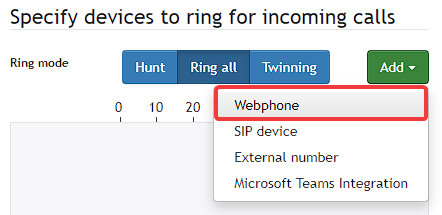
  1. In User, Object select Add and choose Webphone from the dropdown menu
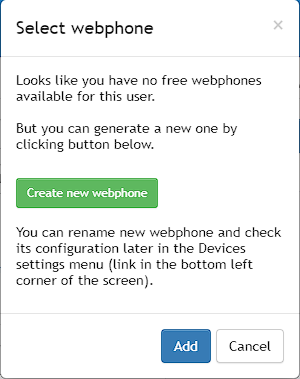
  2. In the pop-up window, select Create New Webphone
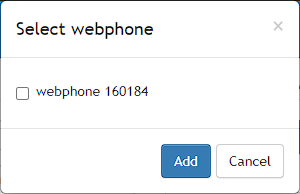
  3. Choose the available device and click Add
  4. Save User Object
  5. Webphone is now available

How to setup – Visual Guide #

  1. In the User Object select Add and choose Webphone from the dropdown menu
    mceclip1.png
  2. In the pop-up window select Create New Webphone
    mceclip2.png
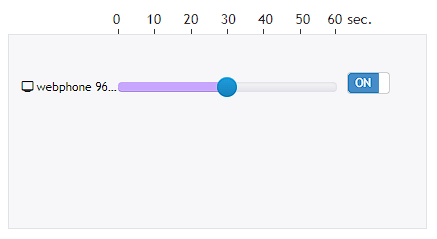
  3. Choose the available device and click Add
    mceclip3.png
    Webphone is now added under devices
    mceclip5.png
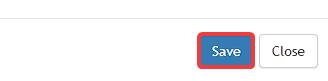
  4. Save User Object
    mceclip6.png
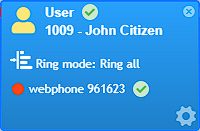
  5. Webphone is now available
    mceclip4.png
What are your Feelings

Share This Article :

  • Facebook
  • X
  • LinkedIn
  • Pinterest
Still stuck? How can we help?

How can we help?

Updated on 5 August 2023
Webphone TroubleshootingWebphone End User Set Up
Table of Contents
  • How to setup - Step by Step
  • How to setup – Visual Guide
About Us
  • Contact Us
  • Privacy Policy
  • Service Agreements
Support
  • Guides & Support
  • Uptime & Outages
Portal
  • My PBX
  • My Hosting
  • Help Me

  BGP Telecom is a Telecommunications Industry Ombudsman (TIO) compliant business.

Copyright © 2023 BGP Group Pty. Ltd. | ABN: 25641461574